Billing
Bills from the day's visits, and a receipt for every payment.

How it works


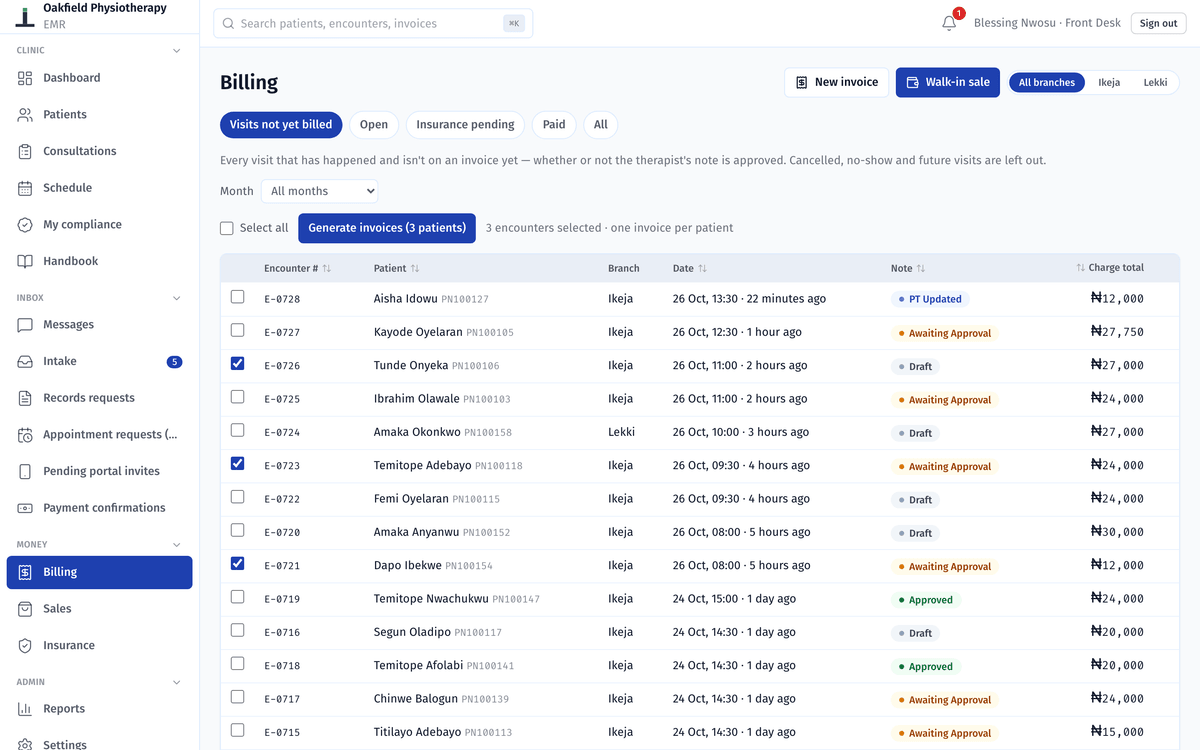
1. Bill the day's visits
Before closing, the desk opens Visits not yet billed. Every visit that has happened without a bill is on that list, whether or not the physio's note is approved yet.
- Every visit that has happened and has no invoice yet
- Tick them and generate the invoices, one per patient
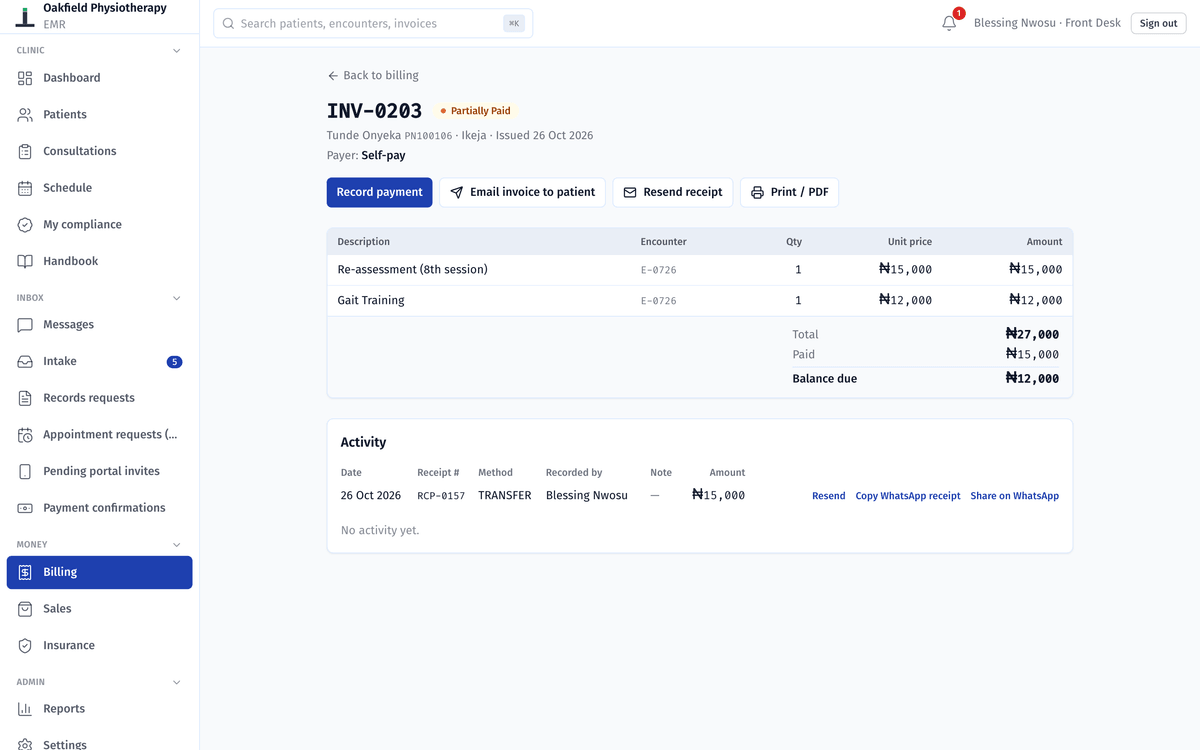
2. Record what the patient paid
Cash, transfer or POS. A part payment is fine: the rest stays on the invoice as the balance due, and each payment gets the next receipt number.
- What the patient still owes
- Each payment, with its method, its receipt number and a WhatsApp share
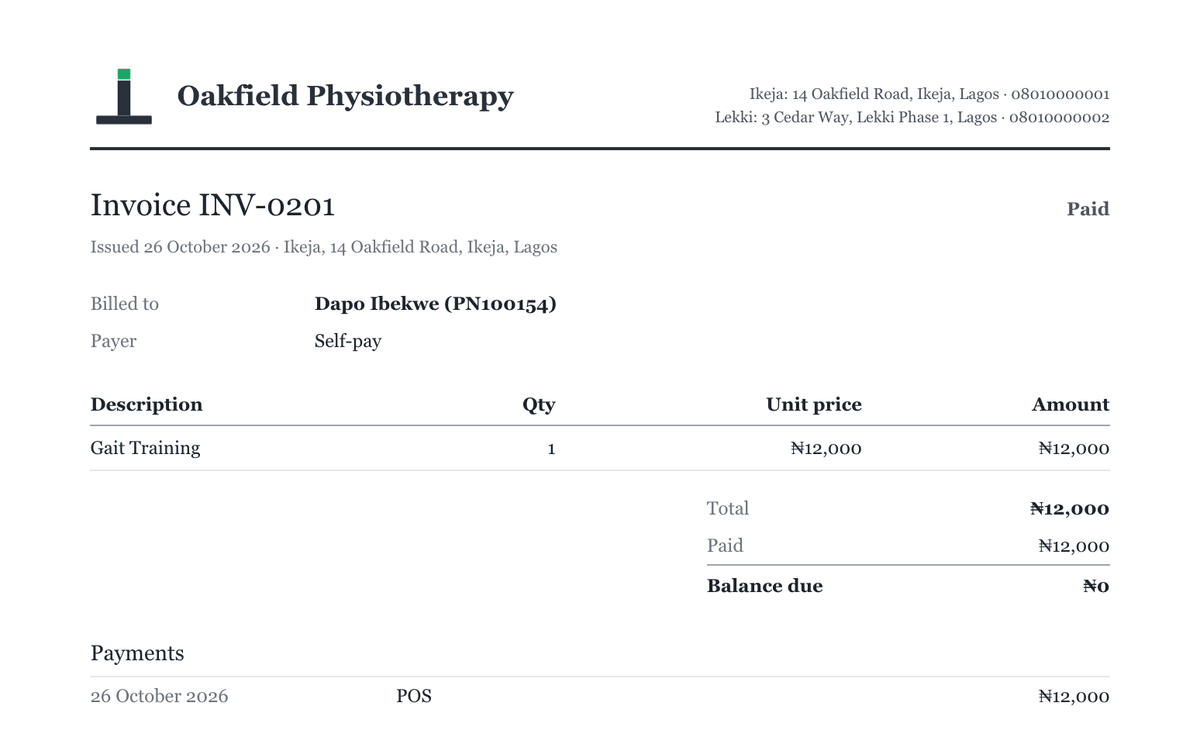
3. Send the receipt
By email when the patient has an address, on WhatsApp, or printed on the clinic's letterhead. A WhatsApp receipt carries the amounts paid, never the treatment.
HMO patients and their claims
Add each HMO once, with what it covers. From then on, an HMO patient's invoice splits into what the scheme covers and what the patient owes, and the desk takes only the patient's part.
The scheme's part becomes a claim. Mark it paid when the money comes in, or rejected, which moves the balance to the patient.

- Claims still pending, and what the HMOs owe the clinic in total.
- What each HMO owes, how many of its claims are overdue and how old the oldest is.
- Claims by status: pending, overdue by 30 days or more, paid or rejected.
- Pick the HMO and the month, and export its claims as a spreadsheet (in beta).
When a patient pays by transfer
In the patient app, Bills and payments (beta) shows what the patient owes and how to pay the clinic. After a transfer, they tap I've paid and enter the amount, the date and the reference.
The desk sees it under Payment confirmations, checks the bank app, and confirms or rejects it. Nothing changes on the bill until the desk confirms, and then the patient gets their receipt.

Your own prices
The admin sets the clinic's visit types and procedures, and the price of each. A price can differ by branch or by HMO, and a long price list can come in from a spreadsheet.
A price is saved with the visit when it's charged, so changing a price later never changes an old bill.
Also in billing
Paid before the visit (beta)
Take a payment at the desk before the session, and use it when you bill the visit.
Packages and advance payments (beta)
Record a payment for upcoming sessions and apply it to visits when you choose. Nothing is applied by itself.
Walk-in sales
Products and one-off items, paid on the spot with a receipt.
Void, never delete
Only the admin voids an invoice, with a reason, and it stays on the record marked void. A paid invoice can't be voided.
Write-offs
For money that will never come in. A write-off needs a reason and never counts as revenue.
Physios never handle money
Prices, payments and receipts stay with the desk, the accountant and the admin.
Read the docs
All docs- Daily workBilling and HMO claimsSet your prices, bill the day's visits, record cash, transfer and POS payments, send receipts, and split HMO bills and follow up claims.
- PatientsPatient portal and family accessInvite a patient to their app, what they can see and do there, records requests, family access with consent, and what stays private.
- Start hereRoles and permissionsThe five roles in Stator, what each one sees and does, and how to add, lock or remove a staff member.
Related
- Reports, compliance and the handbookThe dashboard, late notes, open home visits and who has read the handbook.
- Patient app and family accessAppointments, exercises and bills in the patient's browser.
- Clinics with many HMO patientsSplit invoices, what each HMO owes, and each month's claims ready to export.
We'll bill a day's visits on a demo clinic, HMO patients included.